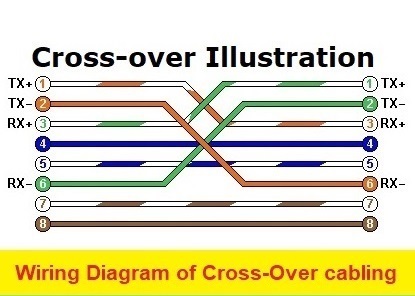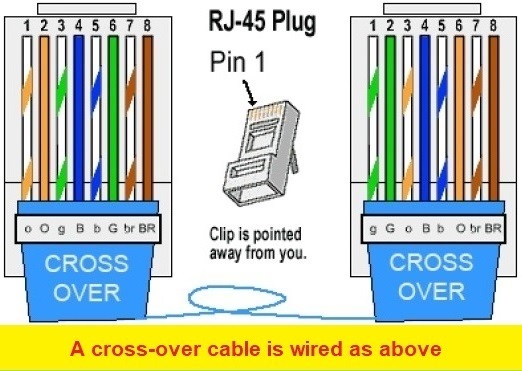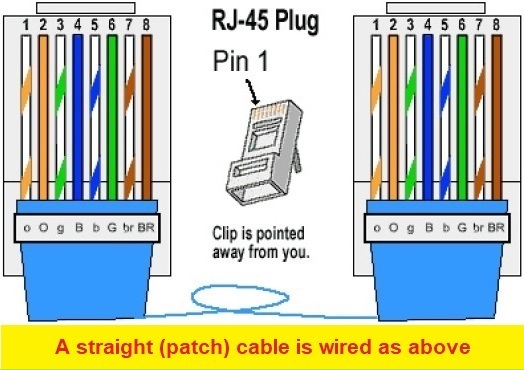
There is only two ways to wire an Ethernet UTP, STP or FTP cable. That is straight-through (patch) or cross-over.
Crossed cables are now practically irrelevant for anything but older equipment. Modern switches auto-sense the connections meaning that you can use straight cables almost everywhere – but when using devices without auto-sensing abilities, you may still need a crossed-over cable.
The easiest way to remember where to use a cross-over cable, is to know that devices that transmit and receive on the same pins require cross-over.
That is for example Pc to Pc, Router to Router, PC to Router, Switches to Bridge, etc. (this will require cross-over.)
Likewise, devices that transmit and receive on opposite pins require straight-through. That is for Switch to PC, Switch to Router, etc.
| 1 | PC's |
| 2 | DVR’s and NVR’s |
| 3 | Routers |
| 4 | Wireless Access Point (AP) |
| 5 | IP Camera’s |
| 6 | Network printers |
| 1 | Switches |
| 2 | Bridges |
| 3 | Hubs |